
Products / S.A.L.T NEXUS
S.A.L.T NEXUS
One sovereign console for every server and desktop you run. Terminals, files, fleet health and remote desktop in one browser tab, with an AI engineer that reads, runs and reports with you, on any device.
/dev/vda 252G 84G 168G 34% /
operator1@app-server-01:~$ systemctl --failed
0 loaded units listed.
operator1@app-server-01:~$ uptime
09:41:02 up 32 days, load: 0.21
operator1@app-server-01:~$ █
Running an estate still means six tools and a lot of copy-paste
An engineer's day: one client for each server, a separate tool for files, a remote-desktop tool for the Windows box, a monitoring page nobody checks, passwords in a notebook, and terminal output pasted into a chat AI that cannot see the machine. Nothing is shared, and nothing is recorded in one place.
Tools everywhere
Terminal, file transfer, remote desktop, monitoring and AI are separate apps with separate logins and no shared history.
Credentials scattered
Passwords and keys live in notes, scripts and personal laptops, with no control when people move on.
AI that cannot see
Chat assistants guess from pasted snippets. They cannot run a command, read the screen, or check their own advice.
No view of the fleet
Disks fill and restarts pile up unseen. Most monitoring needs an agent on every machine before it shows anything.
Remote desktop outside
Desktops behind NAT go through a third-party relay, outside the organisation's audit and its own servers.
Tied to one desk
Close the laptop and the session is gone. A phone cannot pick up where the office PC left off.
What S.A.L.T NEXUS changes
| Before | With S.A.L.T NEXUS |
|---|---|
| A desktop SSH client per PC | A web app for Windows, macOS, Linux, Android and iPhone. Sessions live on the server and keep running when the browser closes. |
| Passwords in notes | A vault on the server: every secret sealed with AES-256-GCM, unsealed only to connect, never sent to a browser. |
| A separate file tool | Files beside every terminal, server to server, and any local folder through the NEXUS local bridge. |
| Monitoring as a project | NEXUS Fleet reads the health of every server through the access NEXUS already holds. Nothing to install. |
| Remote desktop through outsiders | NEXUS Desktop: RDP and VNC with nothing installed, or the NEXUS Agent behind NAT, relayed by your own NEXUS server. |
| Copy-paste into a chat AI | NEXUS AI sees the live terminal and the remote screen, runs commands and clicks with you, and asks before anything risky. |
| Nobody knows who did what | Roles, private hosts and one audit log for sign-ins, sessions, commands, desktops, transfers and AI steps. |
One tab: every server, every desktop, and an AI engineer beside you
Open it on the office PC, carry on from the phone. Every device shows the same sessions, the same screens and the same conversation, live.
One console, four modules, one intelligence
S.A.L.T NEXUS is the secure-access and operations layer of S.A.L.T CI. A NEXUS server holds people, hosts and credentials; the web app reaches Linux, Windows, BSD and macOS machines over SSH, RDP, VNC or the NEXUS Agent. The modules share one sign-in, one vault and one audit log.
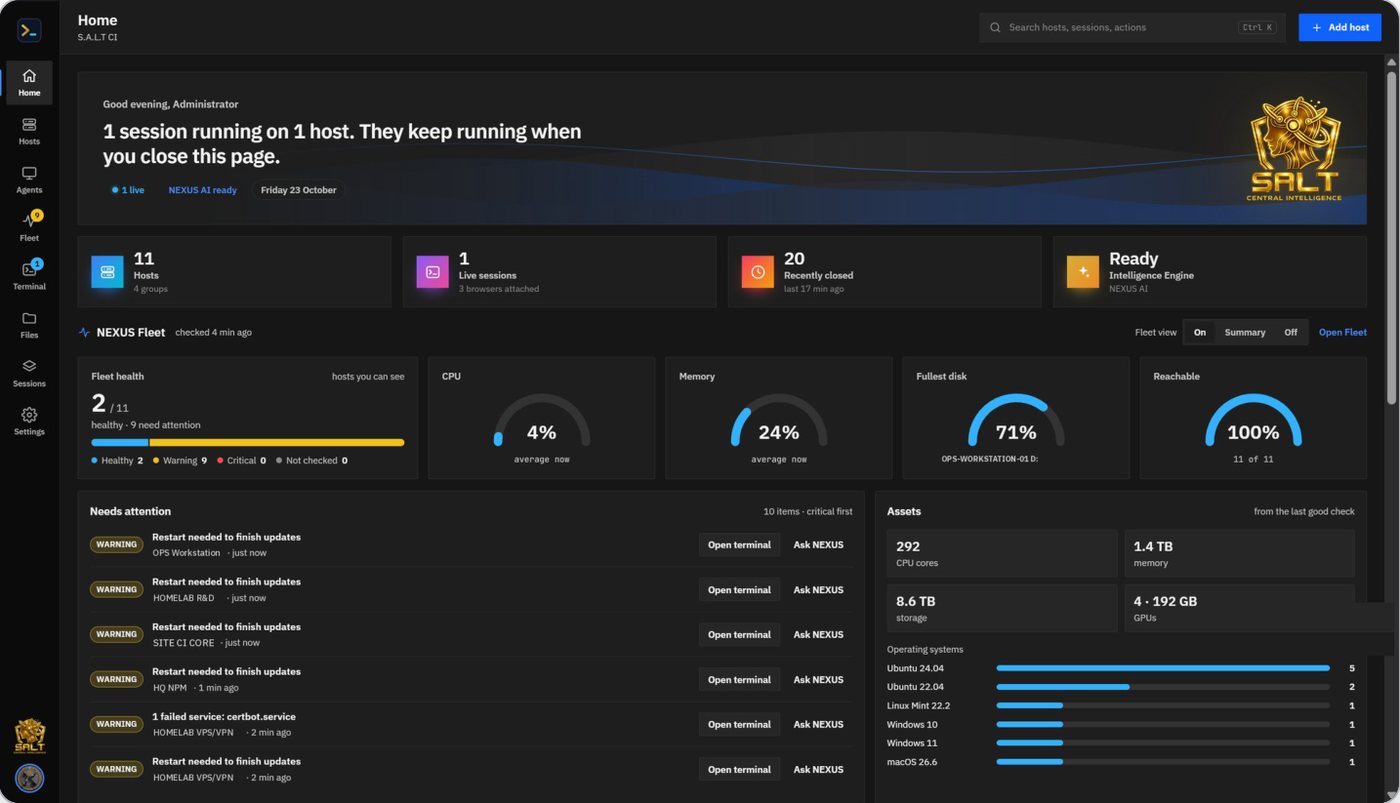
NEXUS Shell
SSH terminals and files in the browser. Sessions outlive the page and follow you to every device.
NEXUS Fleet
Health and assets of every server and PC, agentless over SSH or reported by the NEXUS Agent.
NEXUS Desktop
Remote desktop over RDP and VNC, or the NEXUS Agent for Windows, Linux and macOS behind NAT.
NEXUS AI
The NEXUS Intelligence Engine: reads terminals and screens, runs and clicks with you, writes the report.
Sessions that follow you
Terminals and desktops run on the NEXUS server. Close the page, open it on the phone, and pick up the same tab with what happened while you were away.
Ctrl+K for everything
Connect, attach, open a desktop, jump to any host or page, add a host or switch theme from one palette.
One record
Every sign-in, session, transfer, desktop, consent answer and AI step is audited with person, time, address and outcome.
A terminal that works with you, not just for you
Many tabs, many sessions to one host, and NEXUS AI in the side panel watching the same terminal. Read-only steps run by themselves; a step that changes the server waits until someone presses Run it, from any signed-in device.
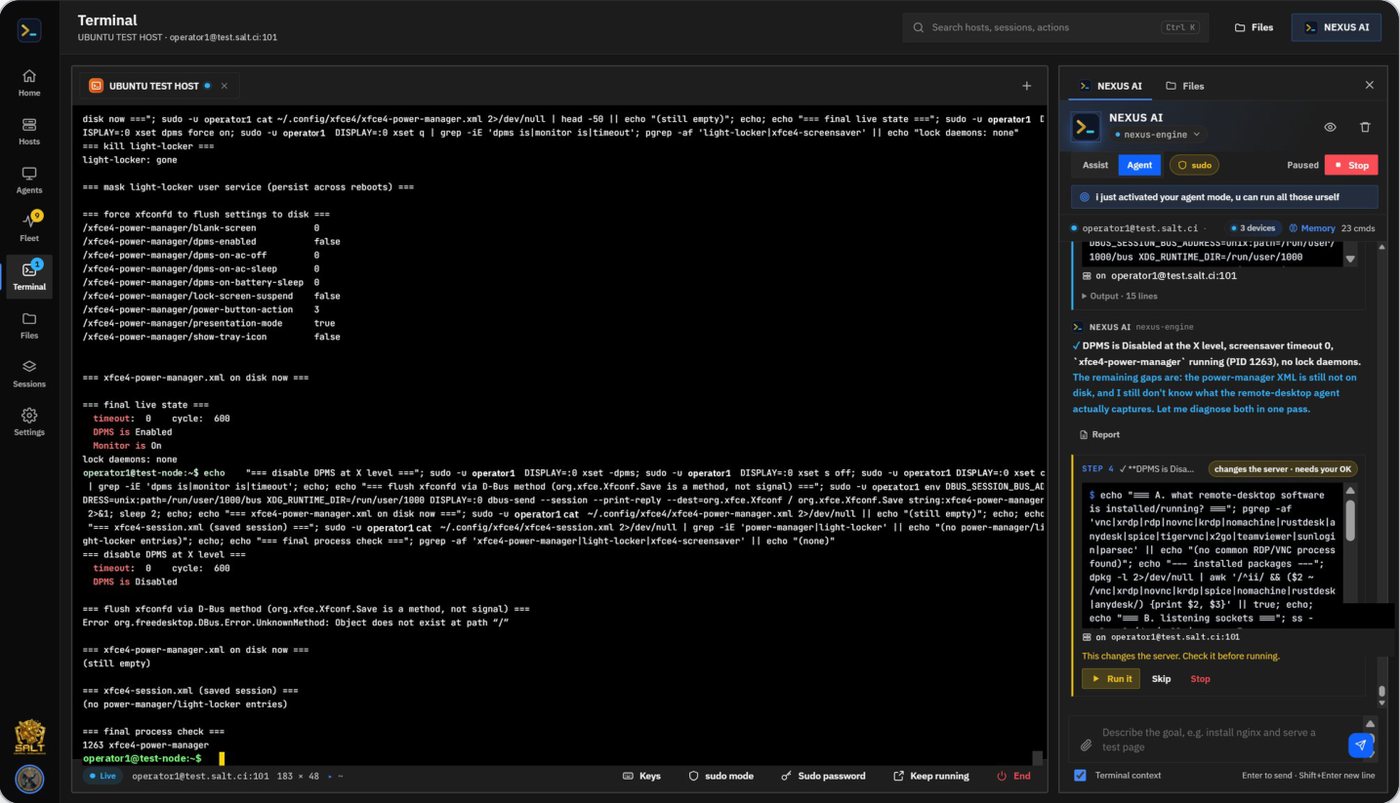
Terminal that follows you
- Background sessions with replay of what you missed
- Reconnect in the same tab when a host drops
- bash, zsh, BSD shells, Windows cmd and PowerShell
Smart keys
- nano, vim, less, htop and pagers get their own key strip
- One-tap answers to Save? (y/n) prompts
- Ctrl and Alt latches for keys the browser keeps
Sudo from the vault
- One button types the stored sudo password
- Optional automatic answer per host
- Never shown, never logged
Your terminal, your way
- Six themes, fonts, cursor, scrollback and bell
- Right-click paste and a check before multi-line pastes
- Scroll wheel and swipe scrolling, even in full-screen programs
Recorded when it matters
- Session recording and playback per policy
- Searchable timeline of commands and output
- Turned into a branded Word or PDF session report
Team runbooks
- Save a goal as a runbook, such as patch and reboot the web tier
- Shared across the organisation, run by NEXUS AI
- Same safety rails as every agent run
Every file and every host, reachable and in order
Files open beside the terminal over the same connection. Drag between this device and a server, or between two servers, and the copy runs on the NEXUS server, never through the browser.
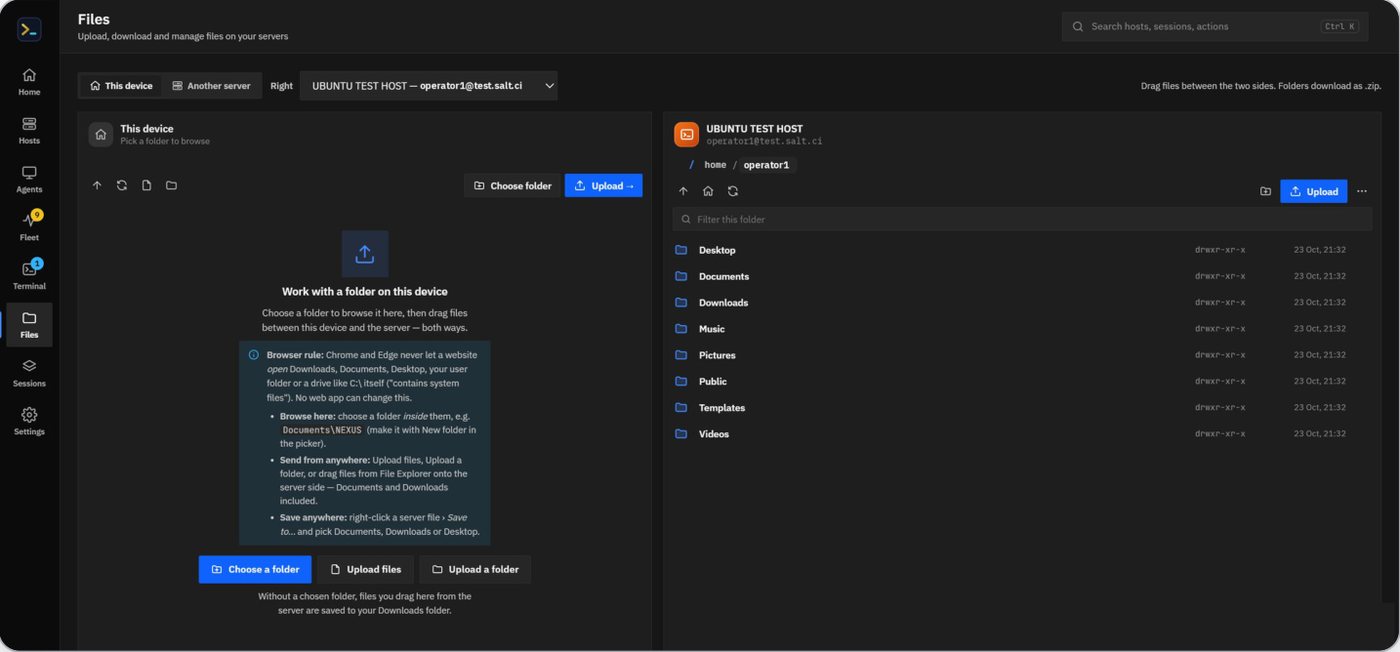
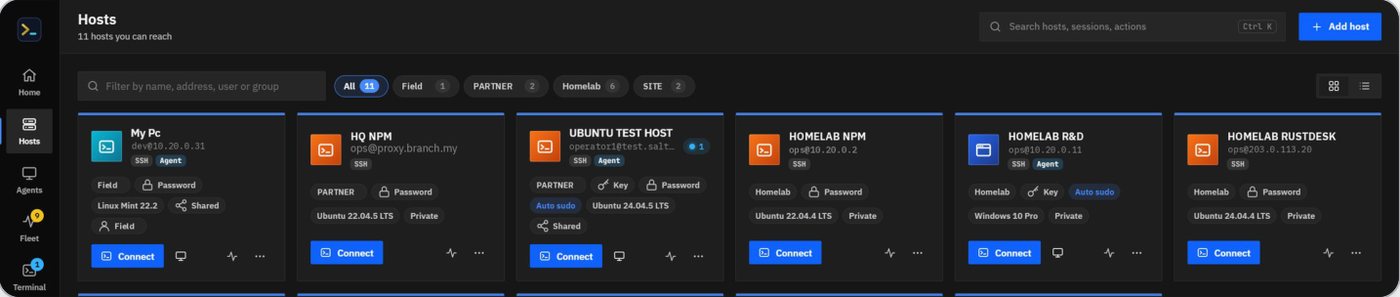
Transfers that finish
Upload, download, zip folders, edit text in place; server-to-server copies with progress on every device; jobs resume after a restart.
NEXUS local bridge
A small helper on your PC opens any local folder, beyond what browsers allow a web app. Off until you install it; audited like any transfer.
Clone a host, or fifty
Duplicate a host with its port, user, sign-in and group, or paste a list of addresses and test them in one go.
Through a VPN tunnel
Presets for WireGuard, OpenVPN, IPsec/IKEv2, Tailscale/Headscale, ZeroTier and SoftEther. Split tunnel only, credentials sealed in the vault.
Jump hosts and bastions
Chain through a bastion to reach private subnets, with each hop's key checked. Machines with no inbound access join through the NEXUS Agent.
The health of the whole estate, with nothing to install
NEXUS already holds trusted access to every server. NEXUS Fleet uses it: one short batch of read-only commands per host, every few minutes, on its own connection. Windows machines report through the NEXUS Agent instead. Management gets the picture without another agent rollout.
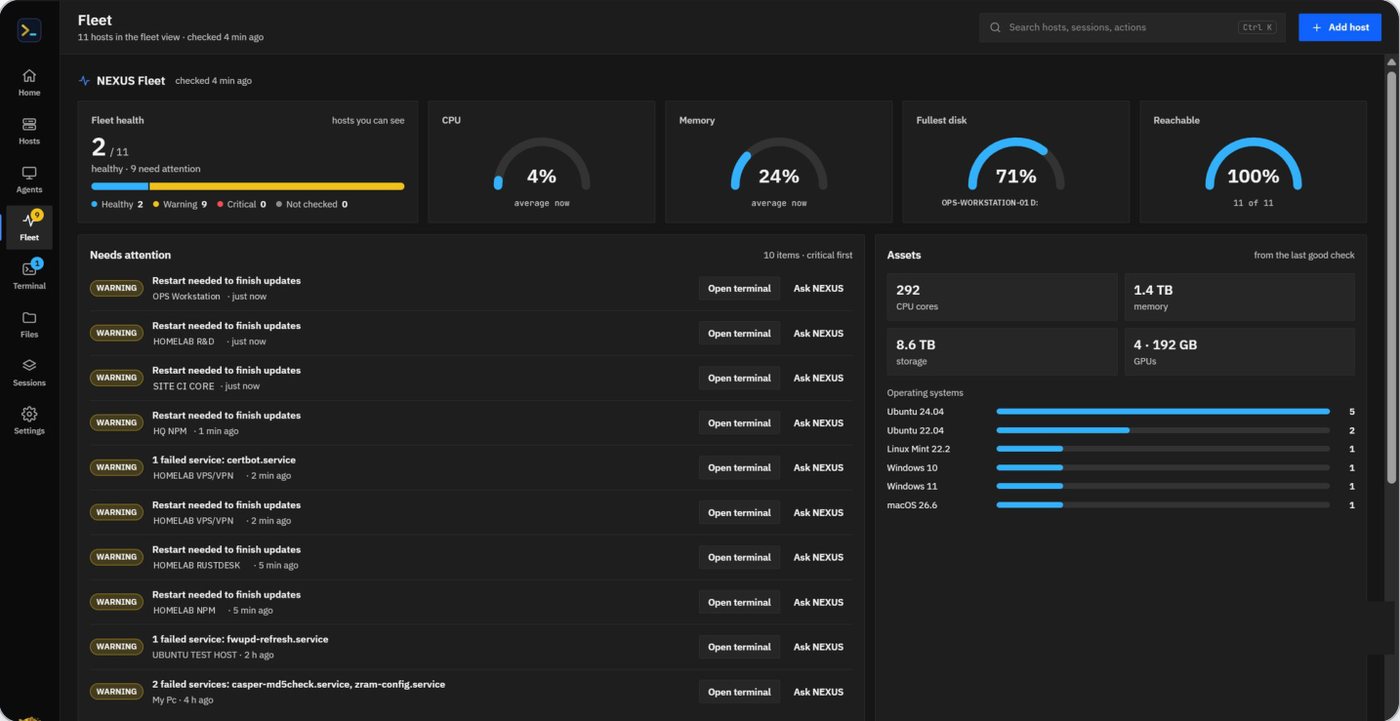
| Checked | Warning | Critical |
|---|---|---|
| Each disk | 80% | 90% |
| Memory | 85% | 95% |
| CPU | 95% | per host |
| Load | 2× cores | per host |
| Failed services | one or more | per host |
| Restart or updates | restart needed | per host |
| GPU temperature | 85 °C | per host |
Thresholds can be set per host. Linux and macOS over SSH; Windows through the agent, with GPU, load and pending Windows Updates.
History and forecasts
30 days of trends per host, and "/data full in about 7 days" before it happens.
Alerts where people are
E-mail and WhatsApp alerts by rule and severity, one per outage, with a recovery notice.
Monthly report
A branded Word and PDF report of health, incidents, capacity and assets, for management.
Viewer role and TV view
Management sees dashboards and reports, never terminals or files. A kiosk view runs on the operations-room screen.
Remote desktop on your own ground, with AI beside it
Machines NEXUS can reach open over RDP or VNC with nothing installed. Machines behind NAT run the NEXUS Agent, which connects out, so nothing opens on their firewall. Your own NEXUS server relays the screen, input, clipboard, files and audio, and audits it all.
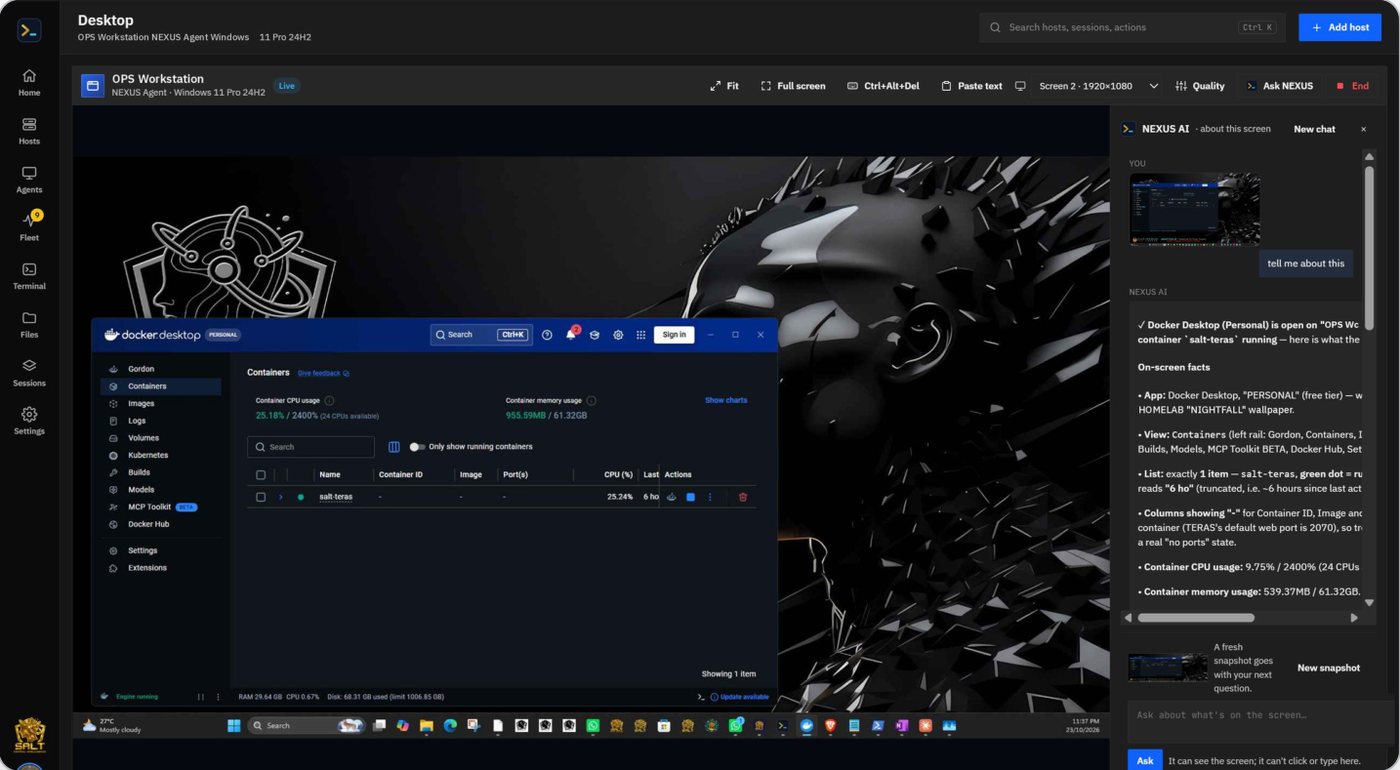
Every system
Windows and Server, Linux (X11 and Wayland), macOS. Sign-in screen, UAC and Ctrl+Alt+Del.
Picture that adapts
Sharp tiles for text; hardware H.264, VP9 or AV1 for motion; bitrate follows the link.
Clipboard both ways
Copy there, paste here, and back again, live. Text and files.
Files and sound
Drop files into the session or pull them out; remote audio plays in the browser.
Consent your way
Unattended, attended, or "Ask the user" once. Every answer audited.
Visible session
A session balloon shows who is connected, on the machine and optionally in your view.
Multi-monitor
Pick any screen; clicks land on the right monitor. Fit, 1:1 and full screen.
Recorded
Recorded per policy, with playback and a session report.
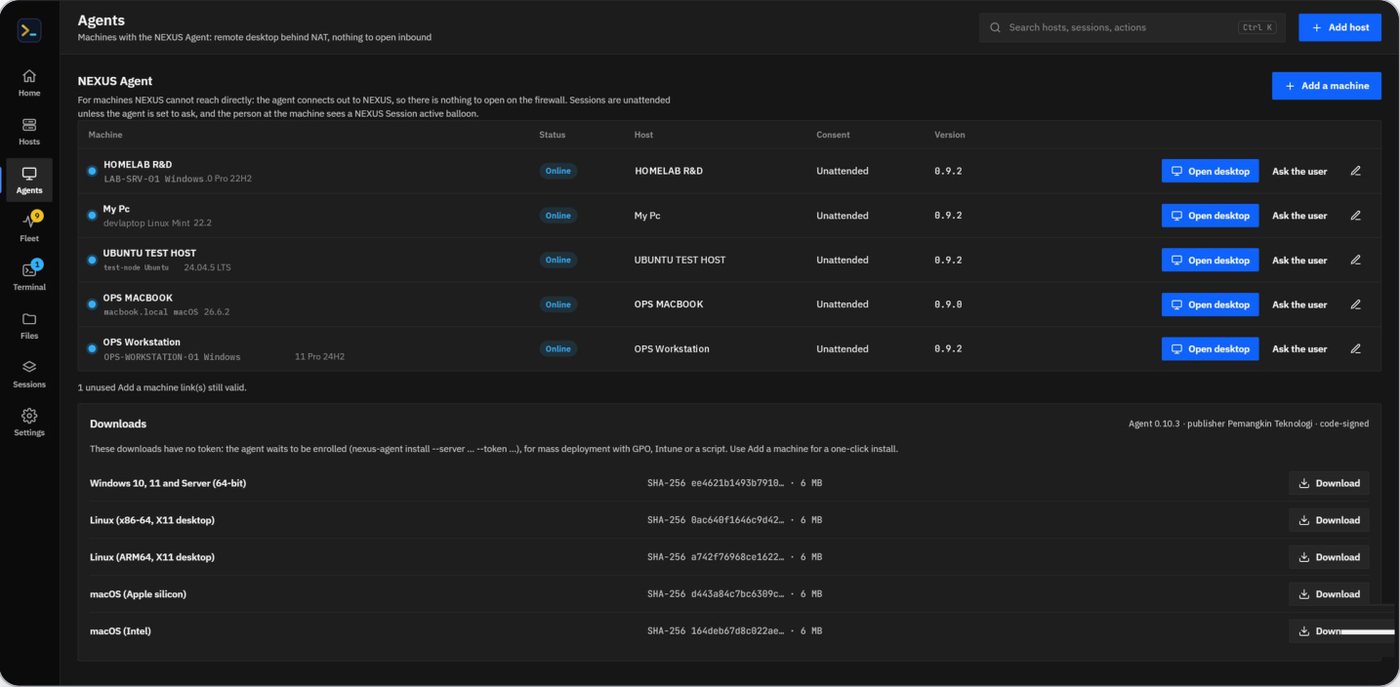
The NEXUS Agent, installed in one press
One signed program with nothing else to install. It runs as a service, connects out to NEXUS over a WebSocket, and gives NEXUS the desktop and, on Windows, the machine's health for Fleet.
One press for hosts already in NEXUS
One file that carries its own enrolment
One line finds the build and the desktop
MSI for GPO and Intune, .deb, .rpm, notarised macOS
Detected and pointed at NEXUS locally
Updates itself
Agents update from the NEXUS release through a signed manifest. No reinstall per version.
Enrol only by invitation
No public IDs to dial. One-time, expiring tokens bound to one organisation; removal stops the agent.
Policy per device
Multi-factor approval and per-device access rules for sensitive machines.
An AI engineer that works inside the terminal
The NEXUS Intelligence Engine does not guess from pasted text. It sees the live terminal, remembers every command run in the session with its exit code, and runs commands in the same terminal you are watching, then reads the real result.
Ask
Ask a question; press Run on the suggested command. It runs in your terminal, the output comes back, and the engine explains it. Explain output, Fix last error and Health check are one tap away.
Give it a goal
It looks around with read-only commands, decides the next step from each result, and finishes with a report of what the commands showed. Anything that changes the server waits for you.
What it knows
The live terminal and session
Output with passwords, keys and tokens removed first; every command, its exit code and folder; the OS, kernel, shell and user.
Reference and memory
Plans and configs as PDF, Word, Excel, PowerPoint or text; notes from earlier sessions on the same host; Fleet data for the host or the whole estate.
Safety rails
Read-only by default
A step runs by itself only when it just looks. SSH, network, firewall, VPN, reboot, kernel and driver steps are marked red and need a separate confirmation.
Checked on the server
No "goal achieved" without evidence from commands; sudo off unless switched on; a step limit; every step audited with its safety level and approval.
Open by design: TERAS, S.A.L.T CI servers or any OpenAI-compatible engine
Servers are tried in order with automatic failover. Each person picks a model and calls TERAS with their own key, so TERAS decides which models and knowledge each person reaches. Answers are generated on the server and stream to every device, so they finish even if the page that asked is closed.
Ask about the screen. Or let NEXUS AI do the clicking.
Switch Ask NEXUS from Ask to Control and give it a goal. NEXUS AI takes a snapshot, decides one action, shows exactly where it will act, does it, and looks again before the next step. It never assumes a click worked.
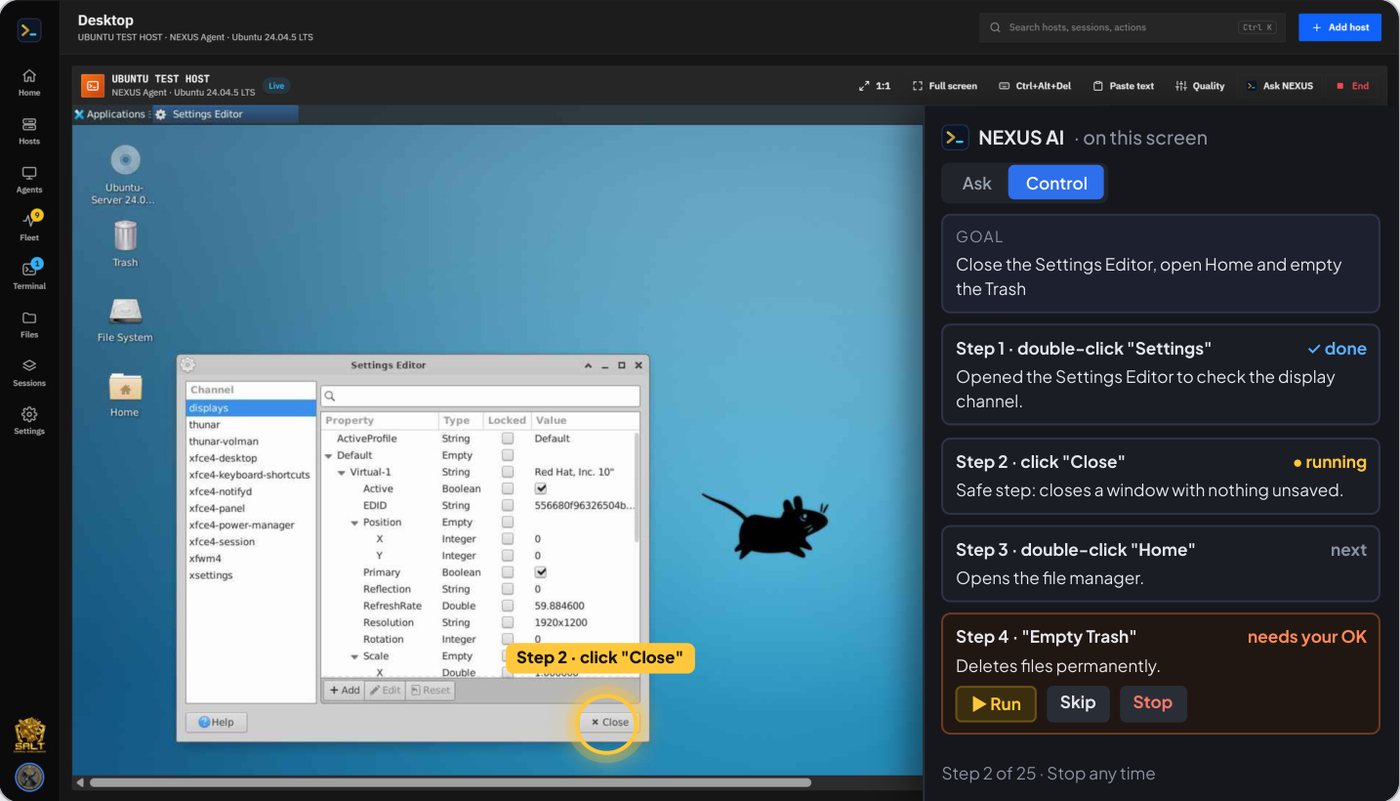
Hybrid confirmation
Safe steps such as a click, typing into a field or scrolling run on their own with the target shown first. Deleting, sending, submitting, buying, closing unsaved work or changing security settings waits for you.
Approve the plan once
NEXUS AI lays out the plan; approve it once, or step by step. Approvals for safe actions can be remembered per application.
Every desktop
Control works on NEXUS Agent desktops and on agentless RDP and VNC sessions alike, with the same safety model and audit.
Its own model
A dedicated grounding model for desktop control, local on TERAS, while chat keeps its own model.
Sees what it targets
A labelled grid and the screen's accessibility tree guide each click, so it finds the real button even when pixels are ambiguous.
Hard limits
A step limit, a stuck-loop guard, a safety net for dangerous key combinations, and Stop that halts at once.
Work that leaves a record
Ask for a report and NEXUS AI delivers a Word file and a PDF with your logo, name and colours. With host memory on, it keeps notes of what was found and done on each server and picks up from there next time.
Branded reports
.docx and .pdf with the organisation's logo, name and colours: health checks, agent runs, sessions and the monthly fleet report.
Host memory
Overview, changes and open issues per host, updated at session end or when an agent reaches its goal. People can edit or clear it.
Personal AI keys
Each person reaches TERAS with their own key, sealed in the vault. Background work uses the session owner's key, never an admin's.
Knowledge, kept in its place
Product facts on a shared model; internal operations on a restricted one. Retrieved passages stay on local models when the site is air-gapped.
From one host to the whole estate
"Which servers will run out of disk this month?" NEXUS AI answers from Fleet's collected data, links each host, and offers the terminal or the desktop to act on it.
Start on the desktop. Carry on from the phone.
Sessions live on the server and every device signed in to the same account is in sync: tabs, terminal output, desktops and the NEXUS AI conversation as it streams. Approve an agent step from the phone while it runs on the office PC.
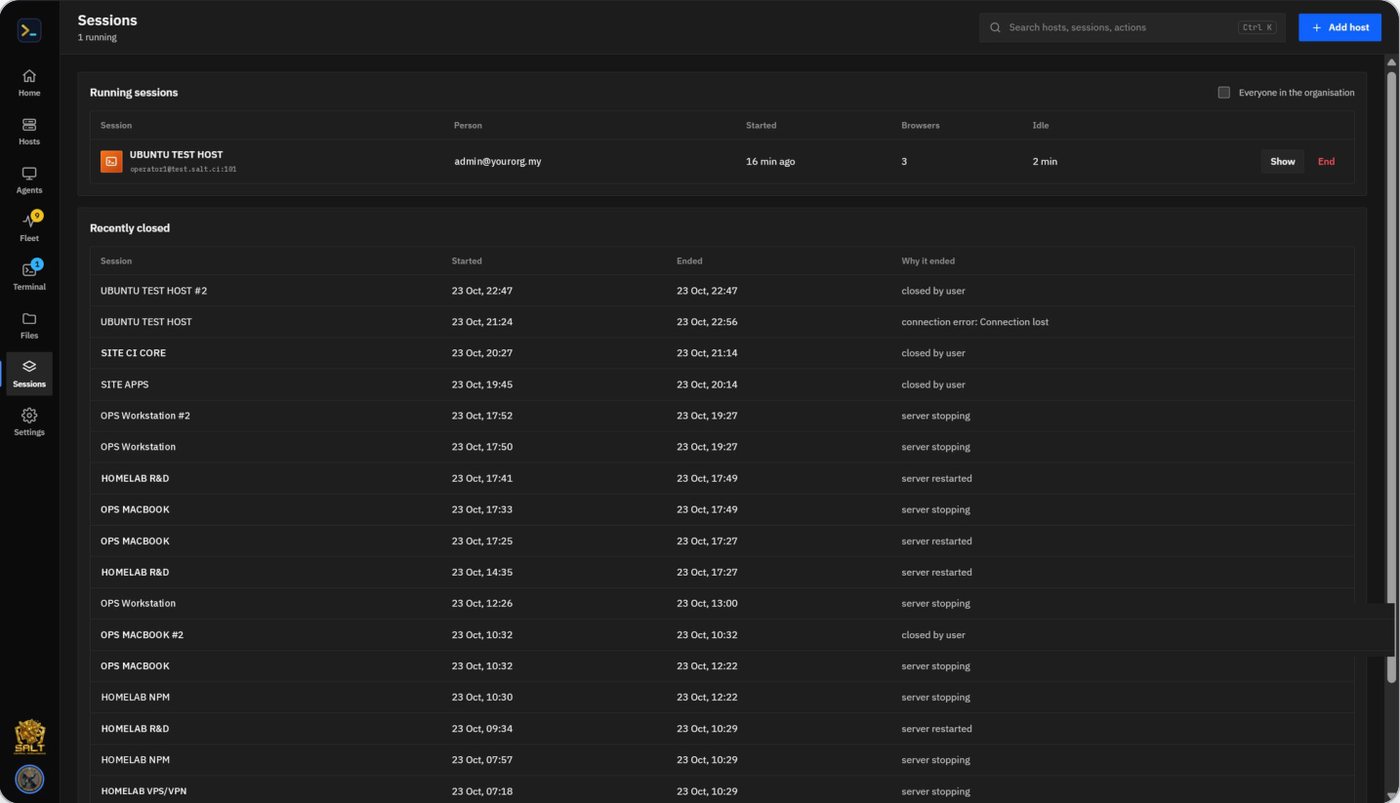
Everything in sync
Open, background, end, rename or reconnect on one device and the others follow. If a proxy blocks live connections, NEXUS falls back to secure polling.
Drops are not dead ends
When a host drops, the tab keeps its last screen and conversation, and Reconnect here continues in the same tab, on every device.
Phone-ready
Bottom navigation, an extra key bar, smart keys, swipe scrolling and a scroll wheel that takes no space.
Desktops on the phone
Pinch to zoom, a touch pointer, the keyboard on demand, and Ask NEXUS for what is on the screen.
Install it as an app
Windows, macOS, Linux, Android and iPhone install NEXUS from the browser.
Fleet on the go
Fleet view On, Summary or Off per device, so a slow connection never pays for charts it does not need.
One server in the middle, nothing secret in the browser
Browsers talk only to the NEXUS server over HTTPS and WebSockets. The server holds the vault, opens SSH, SFTP, RDP and VNC to hosts, relays agents, talks to the AI servers and keeps the record. One codebase serves the hosted multi-organisation service and a client's own installation.
| Layer | Technology |
|---|---|
| Web app | Installable PWA, xterm.js terminal, Guacamole client for RDP/VNC, WebCodecs video; strict Content Security Policy |
| Server | Python, FastAPI, asyncssh, SQLAlchemy; one container plus guacd |
| Agent | Go, one binary per system; Windows service, systemd, LaunchAgent; hardware video encoders where present |
| Data | PostgreSQL in its own container (SQLite for small installs); volumes kept across upgrades |
| AI | TERAS, S.A.L.T CI and OpenAI-compatible adapters; ordered failover; per-person model and key; separate model for desktop control |
Built for organisations that answer for every access
Credentials stay on the server, every person sees only what they should, and the organisation keeps a record of who connected where, what was run, what was clicked and who agreed to it.
Sealed credentials
Passwords, keys, sudo, desktop, VPN and AI keys sealed with AES-256-GCM in a three-level key hierarchy. Decrypted only at connect time.
Roles and private hosts
Admins, operators and viewers. New hosts are private to their owner and admins until shared.
Strong sign-in
Multi-factor sign-in and single sign-on (OIDC, including sign-in through TERAS). Idle sessions expire.
Audit log
Sign-ins, sessions, sudo fills, AI commands and clicks with their safety level and approval, desktops and consent, transfers and reports.
Safe AI context
Stored secrets and anything that looks like a key, token or IC number removed before output or screens reach the AI.
Organisation isolation
Every record carries its organisation and every query is scoped to it, so one service can host many client organisations.
| Hardening | How |
|---|---|
| Hosts | A host's key is recorded on first contact; if it changes, connections stop until an admin compares and accepts it |
| Desktops | Agents enrol only with one-time, expiring, organisation-bound tokens; consent per machine; visible session balloon |
| Agent binaries | Code-signed on Windows and notarised on macOS; SHA-256 published; self-update through a signed manifest |
| Browser | Strict Content Security Policy, frame blocking, no-referrer; cross-site requests refused |
| Data | The master key lives only in the server's environment; a database backup without it cannot unlock any credential |
Sovereign by design
NEXUS, its agents and its AI can run entirely inside the client's network, including air-gapped sites, with TERAS and local models. Nothing needs a foreign cloud.
Hosted for you, or installed on your own ground
The same product runs as a hosted, multi-organisation service or inside a client's own network. It needs a Docker host and network reach to the machines it manages; nothing is tied to particular hardware.
Hosted service
- Many client organisations on one service, each isolated
- Reaches client servers over the network, a VPN preset or the NEXUS Agent
- Updates delivered centrally; agents update themselves
- Organisation admins manage their own people, hosts and AI servers
Own installation (white-label)
- Runs entirely inside the client's network, including air-gapped sites
- Uses the client's own AI servers: TERAS or any compatible engine
- The client's name, logo and colours on the app, reports and session balloon
- Data, recordings and the master key stay with the client
| An installation needs | Details |
|---|---|
| Host | Any machine that runs Docker (Linux or Windows): the NEXUS server, guacd and PostgreSQL |
| Network | SSH, RDP or VNC from the NEXUS server to managed hosts; agents need only outbound HTTPS to NEXUS |
| AI | Optional: one or more AI servers; terminals, files, Fleet and desktops work without one |
| Licence | Per organisation: modules, seats, hosts and agents; offline-capable for air-gapped sites |
Start small, grow without changing tools
One NEXUS server on a laptop or a spare VM covers a team. The same installation grows to hundreds of hosts and agents, more organisations, and a second node behind the proxy.
One platform where others need three point tools
How S.A.L.T NEXUS covers what organisations usually assemble from separate products. Typical capabilities by tool category; individual products vary.
| Capability | SSH client | Remote-desktop tool | Monitoring tool | S.A.L.T NEXUS |
|---|---|---|---|---|
| Terminals and file transfer | Yes | No | No | Yes |
| Remote desktop behind NAT | No | Yes | No | Yes |
| Fleet health with nothing installed | No | No | Usually an agent | Yes |
| AI that sees the terminal and the screen | No | No | No | Yes |
| AI that acts, with your confirmation | No | No | No | Yes |
| One vault and one audit for all access | Partly | Partly | No | Yes |
| Self-hosted, air-gap ready | Yes | Varies | Varies | Yes |
| Same sessions on every device | No | Varies | No | Yes |
Quality gate
More than 1,000 automated checks on every release: the server, the browser, two devices side by side, a touch phone, Windows and macOS hosts, and a live Linux agent streaming a real desktop.
Part of the S.A.L.T CI platform
S.A.L.T NEXUS is how S.A.L.T CI teams reach and run their machines, with TERAS as its engine, alongside TETAMU, TERUSAN, MOM Studio, PERISAI and REKA.
Part of one sovereign platform
S.A.L.T NEXUS runs on the TERAS core with the same sign-in, audit and models as every other S.A.L.T CI application.